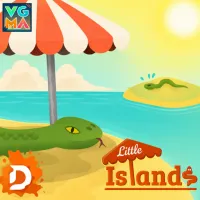
Little Islands is a puzzle game created from scratch that transports you to a charming tropical archipelago, where your mission is to precisely place sunshades to protect green snakes across 15 unique levels.
Little Islands – A Scratch Puzzle Game About Protecting Snakes in a Tropical Archipelago
Little Islands is a scratch puzzle game set in a tropical archipelago where snakes are searching for shade. Instead of controlling a character directly, you must use sunshades to create the necessary protected areas. The goal of each level is clear: get all the green snakes under the shade of the umbrellas. Once all the green snakes are protected, the level is complete.
An engaging setting
Amidst a tiny tropical archipelago, gentle blue waves shimmer under the brilliant sun. This seemingly peaceful scene presents an interesting challenge in Little Islands: helping green snakes overheating from the sun find suitable shade. Players must drag sunshades from the right side of the screen and place them in appropriate spots on the islands.
Game highlights
What makes Little Islands interesting is that not just any location works for placing a sunshade. The umbrella's pole must rest entirely on an island, must not touch any snakes, and the canopy itself must not overlap or touch other sunshades. With 15 unique levels, Little Islands offers a concise, relaxing challenge that is engaging enough to keep you playing until the very end.
Sunshade placement rules
- The pole must be positioned entirely on an island.
- The pole must not touch any snakes.
- The sunshade must not touch any other sunshades.
Dragging and placing sunshades
- Controls for the sunshades are located on the right side of the screen.
- Hold the button, drag the sunshade to your desired spot on the island, and release to place it.
How to remove a shade tile
If you place a tile incorrectly or want to change the layout, you don't have to start over. Simply drag the shade tile toward the right side of the screen until a red "X" icon appears, then release it to remove it.
Differences between snake types
- Green snakes: These are the snakes you need to protect from the sun. Position your shade tiles so that all green snakes are covered by the shade.
- Red snakes: A unique feature of Little Islands is that red snakes do not want to be in the shade. Therefore, you cannot simply place a shade tile in any empty spot; you must ensure green snakes are protected without accidentally casting shade on the red snakes.
Recommended for You